



Technical Support
How to upload web pages:
Cgi Program Settings:
Control your POP3 account
How to Check E-Mail:
Counter Setting
1).WinSCP can be downloaded free of charge from: https://winscp.net/eng/download.php

Download the WinSCP software and install it onto your computer.
2).Find the icon below in desktop when the software is installed.

Double click the icon to Start WinSCP and complete the information as below:
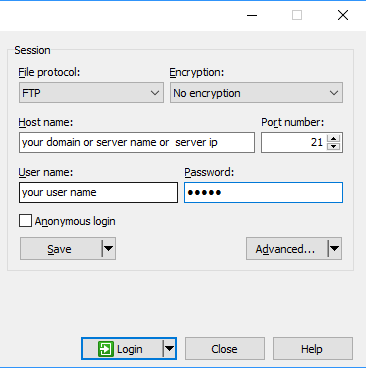
Once youˇre connected to the server, the left panel will show the files and folders on your computer and the right panel will show the files and folders on the ftp server.
Your web files need to be uploaded to the /public_html/ folder. Simply double-click on the /public_html/ folder.